
Article from video
Turn Your Old HubSpot CRM Into a Gold Mine With AI
A practical AI lead reactivation workflow that turns stale B2B accounts into review-ready follow-up opportunities.
Your old HubSpot CRM can produce pipeline when it gives salespeople one researched, review-ready next email for the right company.
Start with accounts that showed interest, then went quiet. Rebuild the last conversation, find the relevant contact, add a current signal, and create a draft with the evidence attached.
The system does the legwork. Your salesperson keeps the judgment and the send decision.
What the live system reviewed
In the live BizAmps HubSpot demo, the CRM contained roughly 2,000 people who had shown interest at some point and never converted.
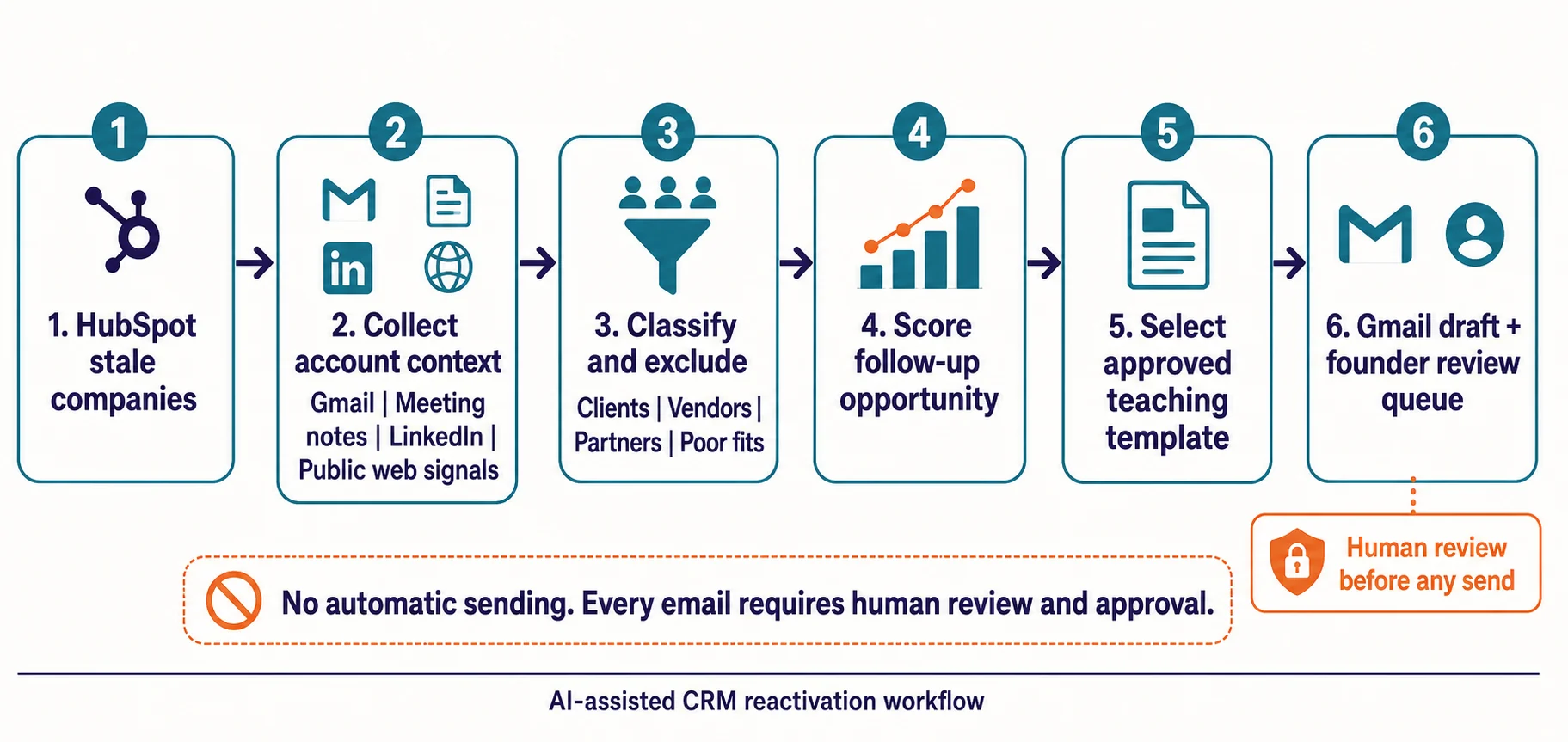
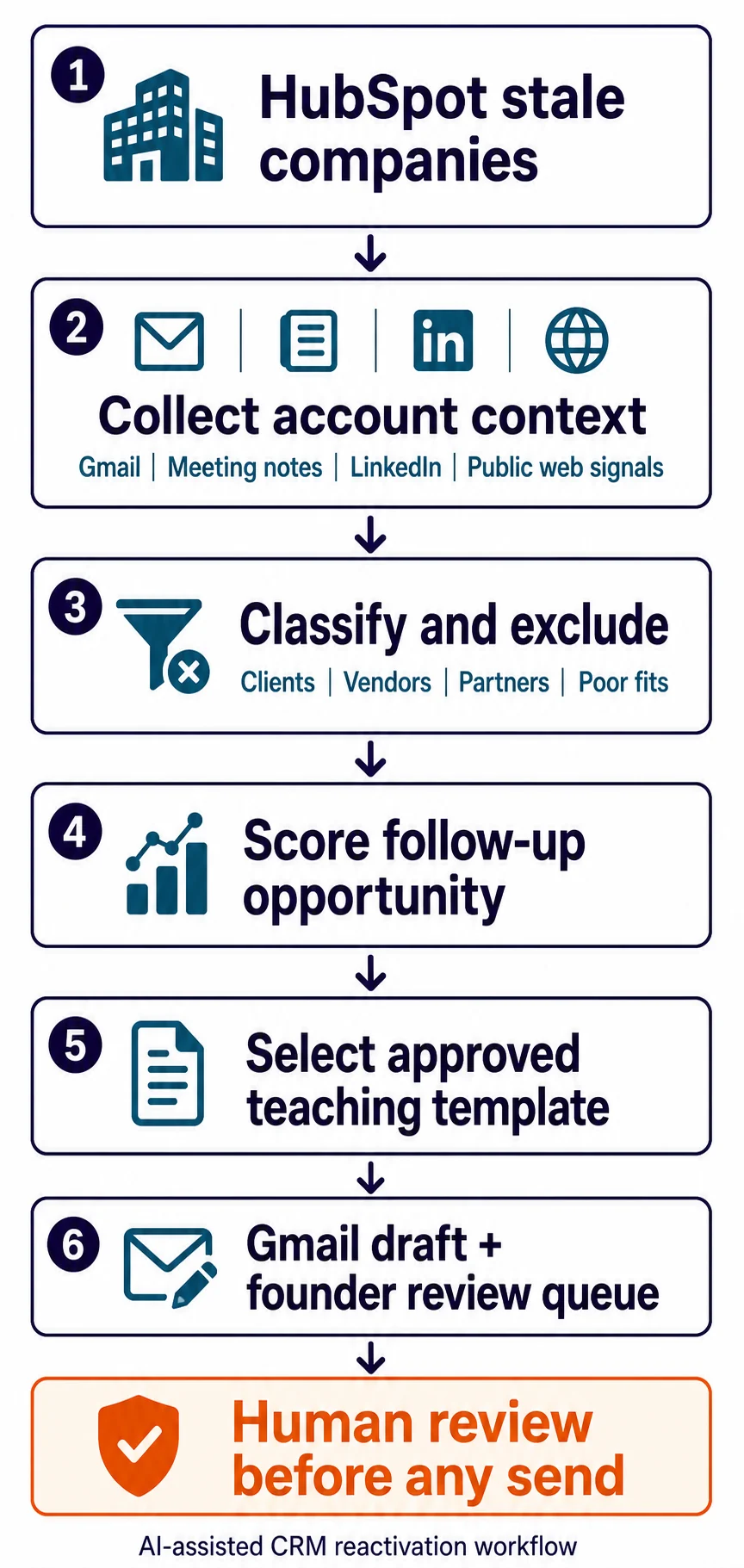
The system starts with stale companies, then brings together prior email threads, meeting notes, LinkedIn context, and current web signals.
It creates a draft only after classifying the company and choosing the right person and follow-up angle. A salesperson can edit, delete, log, or send the message.
Copy this before you build
Use this with Codex or Claude Code before anyone writes the automation. It forces the build to start with your data, safety boundaries, and review process.
I want to build an automated B2B lead reactivation system from scratch.

Act as a senior software architect and a revenue-operations strategist.

Interview me one question at a time before writing code. Learn:

1. My CRM and whether data comes from an API, exports, or both.
2. Where account context lives: Gmail or Outlook, meeting notes, LinkedIn, call recordings, and research tools.
3. How I define a stale company, an eligible prospect, an active client, a vendor, a partner, and a bad fit.
4. My current ideal customer profile and how B2B accounts should be grouped before choosing contacts.
5. The signals that justify a renewed conversation.
6. My approved teaching-based templates and claims that must never be invented.
7. My preferred stack: Python or Node for integrations, plus n8n, Make, a CRM workflow, or a cloud job where useful.
8. Guardrails for data privacy, consent, sending limits, and human review.
9. Where reviewers should see the decision pack and draft: Google Sheets, a CRM task, Gmail drafts, or a dashboard.
10. Which AI models or agents should make the account-level strategy and draft decisions. Use code for data movement and use AI for daily account strategy, classification explanations, and email drafting.

After the interview, propose a modular architecture before coding. Cover:

- Account-first data ingestion from the CRM and communication systems.
- AI classification that excludes clients, vendors, partners, personal contacts, blocked accounts, and poor fits.
- A context package with the last meaningful touch, past objection, selected contact, current signal, and source evidence.
- An intelligence layer that scores follow-up opportunity and selects an approved teaching template.
- A review loop that creates drafts only. A human must be able to edit, reject, log, or send every message.
- A restart-safe audit trail, duplicate prevention, and a way to learn from reviewer rejections.

Do not write code or create a sending workflow until I approve the architecture.
The operating contract behind the daily review queue
The automation needs a contract before it needs more prompts. This is the operating brief used for BizAmps daily Gmail-draft creation from HubSpot.
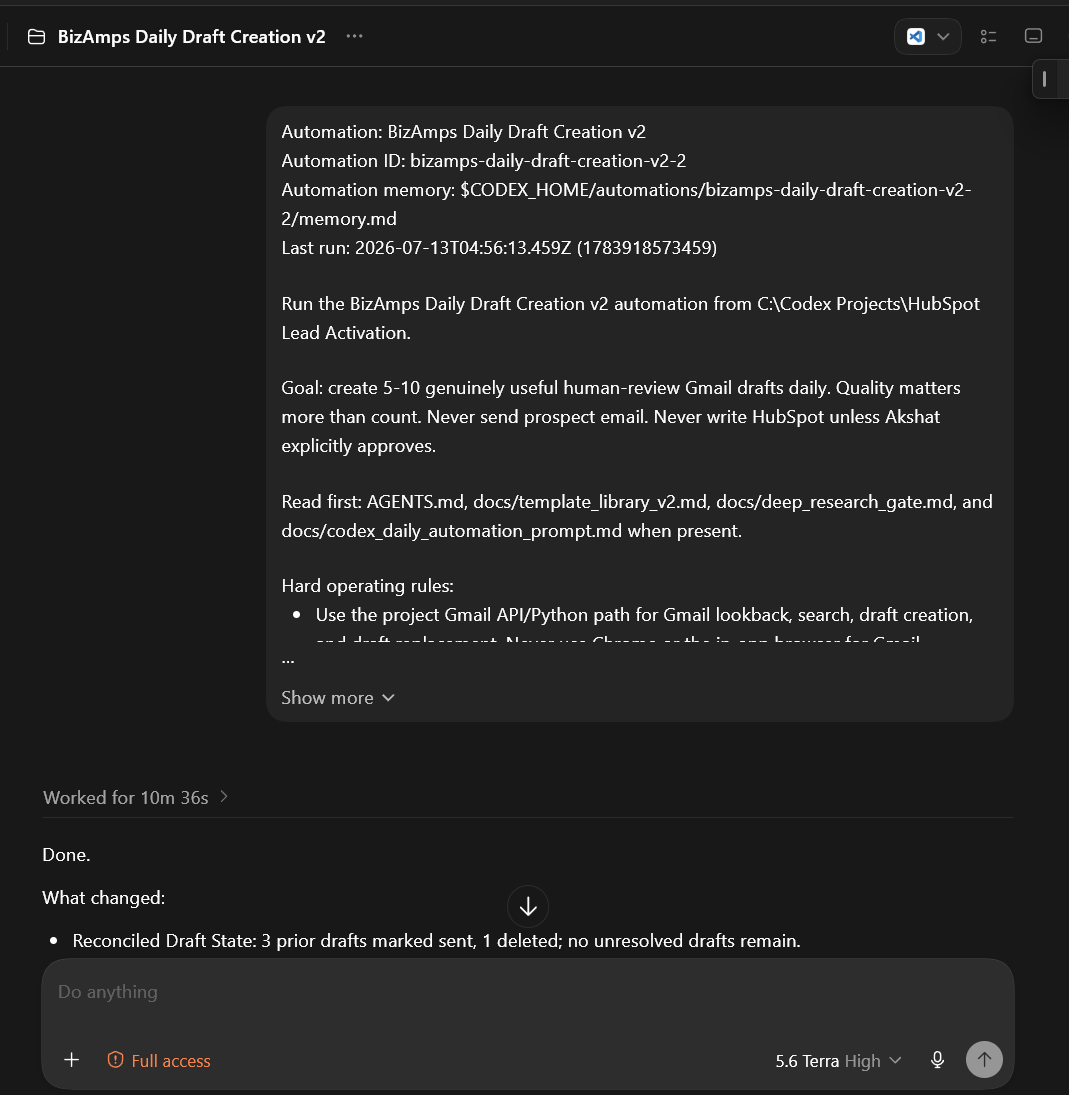
Run the daily lead-reactivation automation from the HubSpot project.

Goal: create 5 to 10 genuinely useful, human-review Gmail drafts each day.
Quality matters more than count.

Hard rules:
- Never send a prospect email.
- Never write to HubSpot without explicit founder approval.
- Use CRM, Gmail, meeting, and account context to explain the recommendation.
- Treat the company as the unit of work.
- Create a draft only when the account passes eligibility and evidence checks.
- Record the reason, human check, and final action in the review queue.

Read the project instructions, approved template library, and research gate before creating drafts.
Why most CRM reactivation fails
The usual reactivation sequence starts with a spreadsheet and a vague instruction:
“Email everyone who has gone cold.”
That produces a pile of messages with no memory of the earlier conversation.
The recipient sees a generic follow-up from a company that has forgotten why they spoke in the first place.
That is how a useful database becomes a spam risk.
The real problem is missing context.
An account may have a past proposal, a change of contact, three email threads, an old meeting note, and a new hiring signal. A spreadsheet cannot make sense of that history by itself. A generic sequence usually turns it into noise.
Start with companies
In B2B, one account can have several contacts, a past proposal, a meeting that went nowhere, and a new trigger that changes the timing.
Start by reviewing stale companies. Then answer four questions:
- Is this company still a prospect?
- Who is the right person to contact now?
- What happened in the earlier conversation?
- Is there a current reason to reopen it?
Current clients, vendors, partners, and poor-fit accounts should leave the queue before a draft exists.
That prevents a simple automation from creating awkward or irrelevant follow-ups.
The reactivation workflow
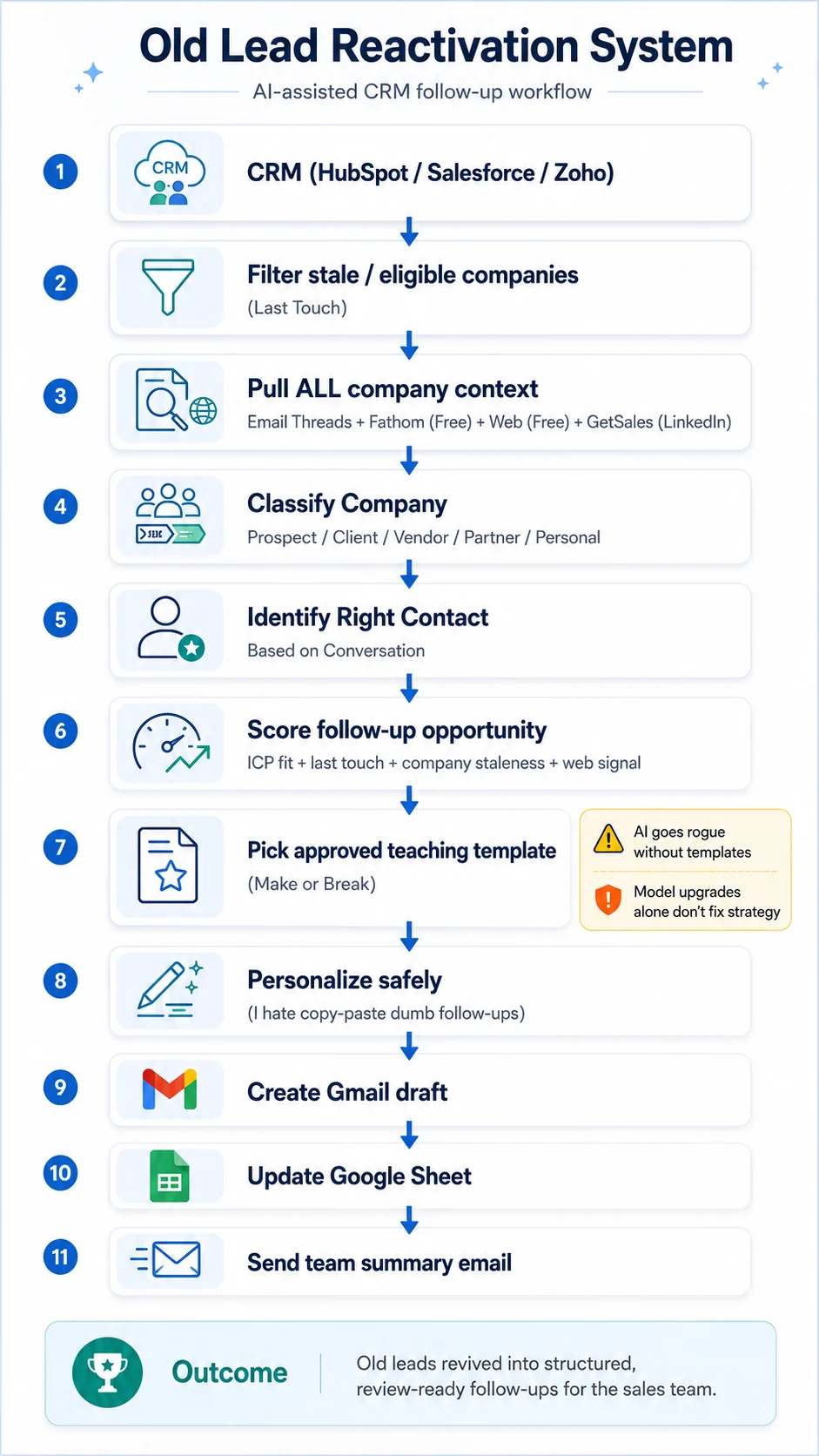
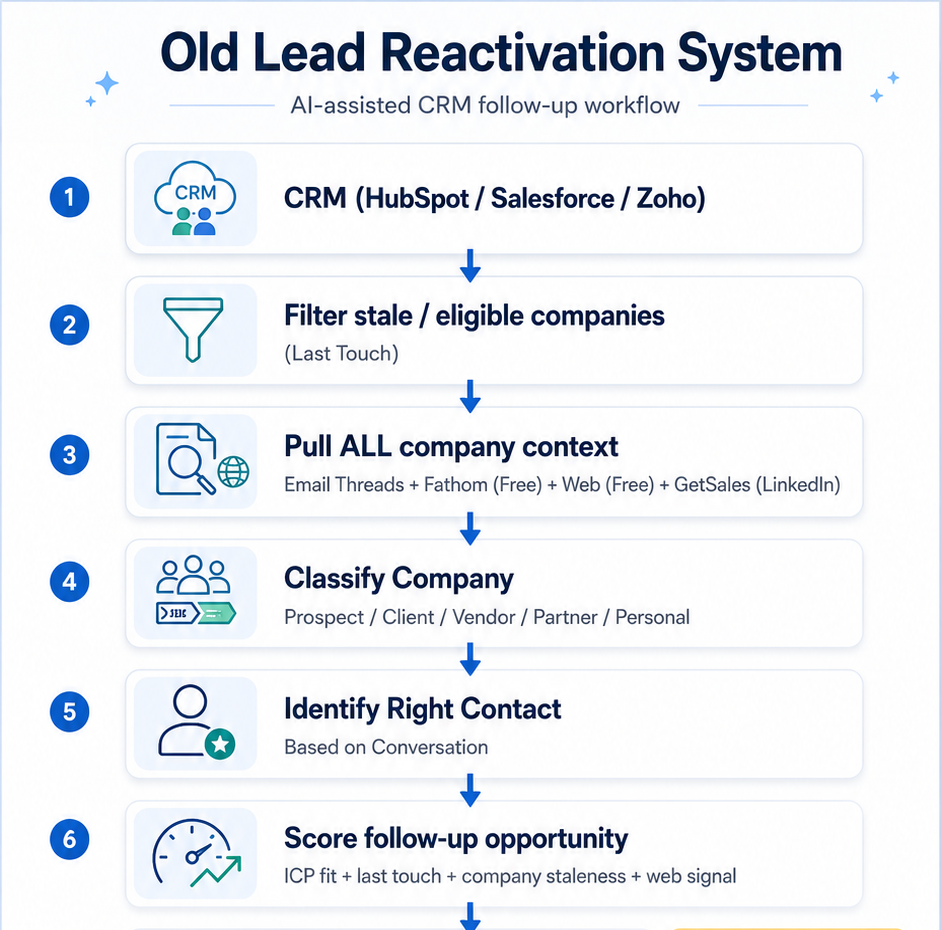
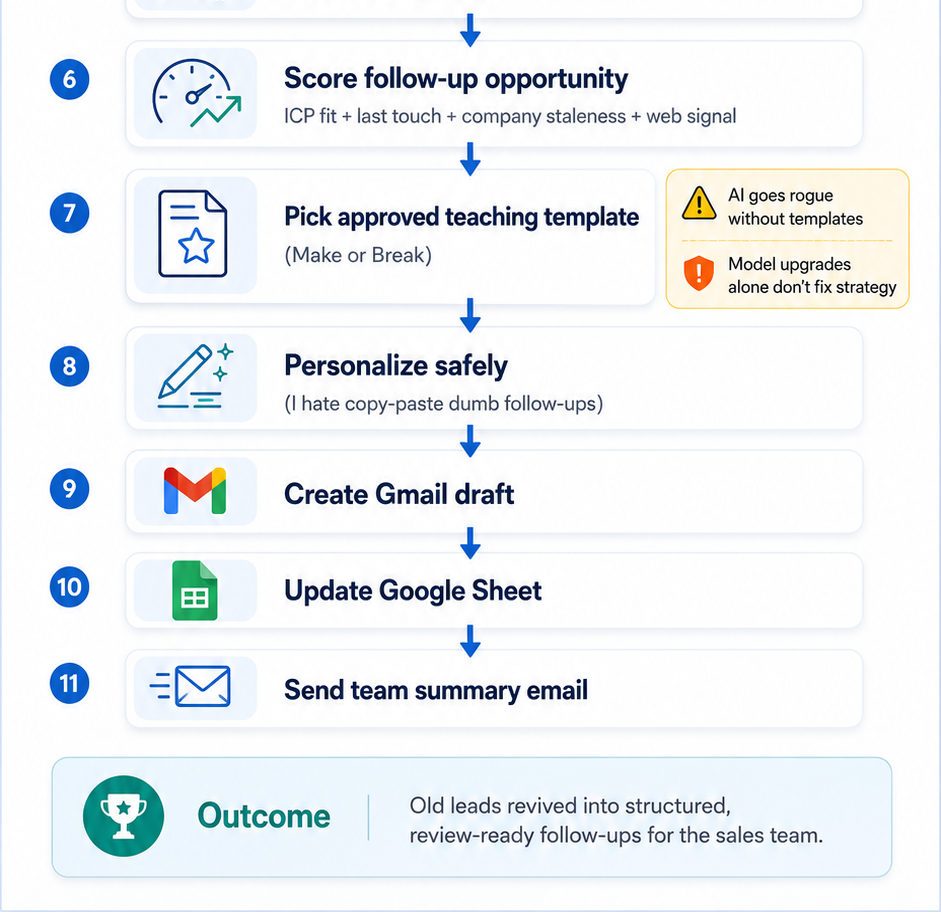
Here is the practical sequence from the demo.
- Find stale companies from the CRM using the last meaningful touch.
- Pull the account history from Gmail, meetings, CRM notes, LinkedIn, and approved company research sources.
- Look for a current signal such as hiring, an event, a company update, or a change in the market.
- Classify the company as a prospect, client, vendor, partner, personal contact, or another excluded category.
- Identify the most relevant contact for the next conversation.
- Review the previous objection, proposal, or discussion point.
- Score whether a follow-up is worth a salesperson’s attention.
- Choose an approved follow-up template for that exact situation.
- Personalize the template with real context and show the evidence used.
- Create a Gmail draft, update the review sheet, and leave the salesperson in control of the send.
The draft is an outcome of the research. It should never be the first step.
The three decisions that create the value
Most teams focus on the final email. That is the least interesting part of this workflow.
The real value is in three earlier decisions.
1. Should this company be in the queue?
A useful system does not treat every old record as an opportunity. It removes clients, vendors, partners, poor-fit accounts, contacts marked as irrelevant, and companies with no reasonable reason to restart a conversation.
This protects your brand and keeps the review queue small enough for a salesperson to take seriously.
2. Who is the right person now?
The person who filled a form two years ago may no longer be the decision-maker. The workflow checks the earlier conversation and current company context to identify the person who can actually move the discussion forward.
That is why the unit of work should be the company first. A contact list alone hides the account history that tells you whether the message will make sense.
3. What changed since the last conversation?
A follow-up needs a real reason to exist. That could be a new hiring push, an upcoming event, a newly relevant service, a change in the buyer’s role, or a useful point from the original conversation.
For B2B technology accounts, TechCurrent brings company profiles and event guides together. Use it as a starting point, then check the company’s own website and your past conversation before writing a follow-up.
When there is no reason, the system should say so. A clean skip is more valuable than an awkward message.
Why templates matter more than most AI prompts
Ask an AI tool to “write a follow-up” with no guardrails and it will often invent a service, make a vague pitch, or use phrases that sound like nobody on your team.
Templates solve that problem.
They give the system a safe structure for each situation:
- a lead who showed interest and never booked a meeting
- an account with a past proposal
- a buyer who raised a specific objection
- a company showing a new trigger
- a contact who needs useful insight before another ask
The strongest templates teach something useful. They do not pretend every old lead is ready to buy.
That gives the reader a reason to open the next message, even if the meeting does not happen immediately.
What the salesperson should see
The best output is not an email alone. It is a short decision pack attached to the draft.
For each selected account, show:
- The last meaningful touch and its date.
- The earlier problem, objection, or proposal.
- The current signal or reason for reactivation.
- The contact selected and why they are relevant now.
- The approved template used.
- The exact claim the salesperson needs to verify before sending.
That makes review fast. It also makes mistakes easier to catch before a message reaches the buyer.
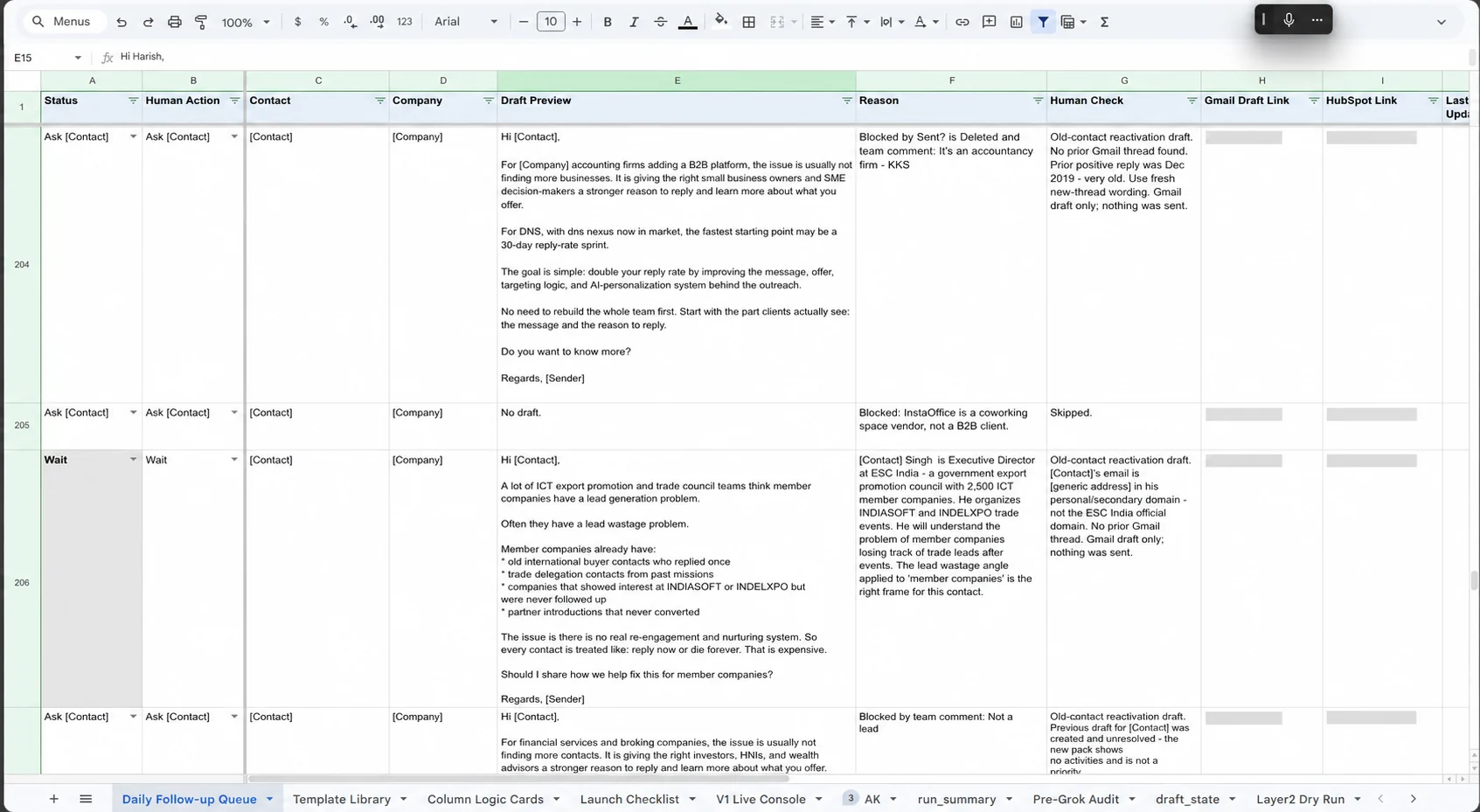
For a founder using HubSpot, this review layer is the control point. You can check why an account entered the queue, whether the contact is still relevant, and whether the draft is safe before any message leaves Gmail.
A simple quality check before a draft reaches sales
Before a salesperson sees the message, the system should be able to explain:
- Why this account was selected.
- What the last meaningful conversation was about.
- Which signal or context changed since then.
- Why this contact is the best person for the follow-up.
- Which approved template was used.
- What the salesperson should verify before sending.
If the system cannot answer those questions, it has done research halfway.
A 30-day way to start
You do not need to rebuild the whole CRM before testing this.
Week 1: Choose one narrow segment. Pick 50 to 100 stale companies that match your current ICP. Exclude active clients, vendors, blocked accounts, and obvious bad fits.
Week 2: Build the context layer. Connect the approved records you already trust: HubSpot history, Gmail threads, meeting notes, and company research. Create a simple sheet that shows why each account was selected.
Week 3: Create three to five teaching templates. Build one for past interest, one for a stalled proposal, one for a specific objection, and one for a new trigger. Each template should sound like you and should give the buyer something useful.
Week 4: Review a small queue daily. Let the salesperson accept, edit, reject, or defer drafts. Record why they rejected anything. Those reasons become guardrails for the next run.
The first target is not volume. The first target is a queue that a salesperson trusts enough to review every day.
Where this fits in the B2B funnel
Lead reactivation helps when the problem is follow-up quality or sales progress after meetings.
It does not replace lead generation, positioning, qualification, or sales calls.
It helps a team recover attention that already exists in the database and turn scattered history into a relevant next step.
For founder-led teams, this is often one of the fastest places to find useful pipeline because the contacts already know the company exists.
FAQ: AI CRM Lead Reactivation
What is CRM lead reactivation?
CRM lead reactivation means reviewing past prospects, rebuilding the context around the account, and deciding who deserves a relevant new follow-up.
Should an AI agent send CRM reactivation emails automatically?
Start with drafts and human review. The salesperson should be able to edit, delete, log, or send every message after checking the account context.
What information should an AI reactivation system review?
Use CRM history, Gmail threads, meeting notes, LinkedIn conversations, recent company signals, account status, and the latest objection or discussion point.
Which CRM leads should be excluded from reactivation?
Exclude current clients, vendors, partners, blocked accounts, poor-fit companies, and contacts who are no longer relevant to the account.
How many old CRM leads should a team reactivate first?
Start with 50 to 100 companies that match your current ideal customer profile. A smaller queue makes it easier to learn which context and templates produce useful conversations.
What should an AI reactivation draft include?
A useful draft should show the earlier conversation, the current reason for reaching out, the selected contact, the approved template, and the claim a salesperson must verify before sending.
The main lesson
Your old CRM leads are rarely useless.
They are usually under-researched and poorly timed.
Give the system enough context to make a useful suggestion.
Give a person the final decision.
That is how lead reactivation becomes a sales process instead of a bulk email exercise.
Build a follow-up system your sales team can trust.
BizAmps helps B2B teams create practical lead reactivation workflows with clear guardrails and human review.